

Meta Title: 15 Must-Do Steps to Secure Your WordPress Website
Meta Description: Learn 15 essential WordPress security tips for 2026 to prevent hacking, malware, and data breaches. Simple, practical, and effective.
In 2026, website security is no longer optional — it’s a necessity. With cyber threats becoming more advanced every year, WordPress websites remain one of the most targeted platforms due to their popularity and widespread use. From brute-force attacks and malware injections to data breaches and phishing attempts, hackers are constantly looking for vulnerabilities to exploit.
WordPress powers over 45% of the world’s websites, a staggering statistic that makes it a prime target for cybercriminals. With AI-driven attacks becoming more sophisticated and quantum computing threats looming on the horizon, securing your WordPress site isn’t just a best practice; it’s a business imperative. Did you know that hacked websites cost businesses an average of $4.45 million in downtime, lost revenue, and remediation efforts last year alone? As a site owner, marketer, or developer, ignoring WordPress security could mean the difference between thriving online and facing a digital disaster.
If you’re running a WordPress site, even a small security gap can lead to serious consequences such as lost data, damaged reputation, SEO penalties, or complete website downtime. The good news? Securing your WordPress site doesn’t have to be complicated.
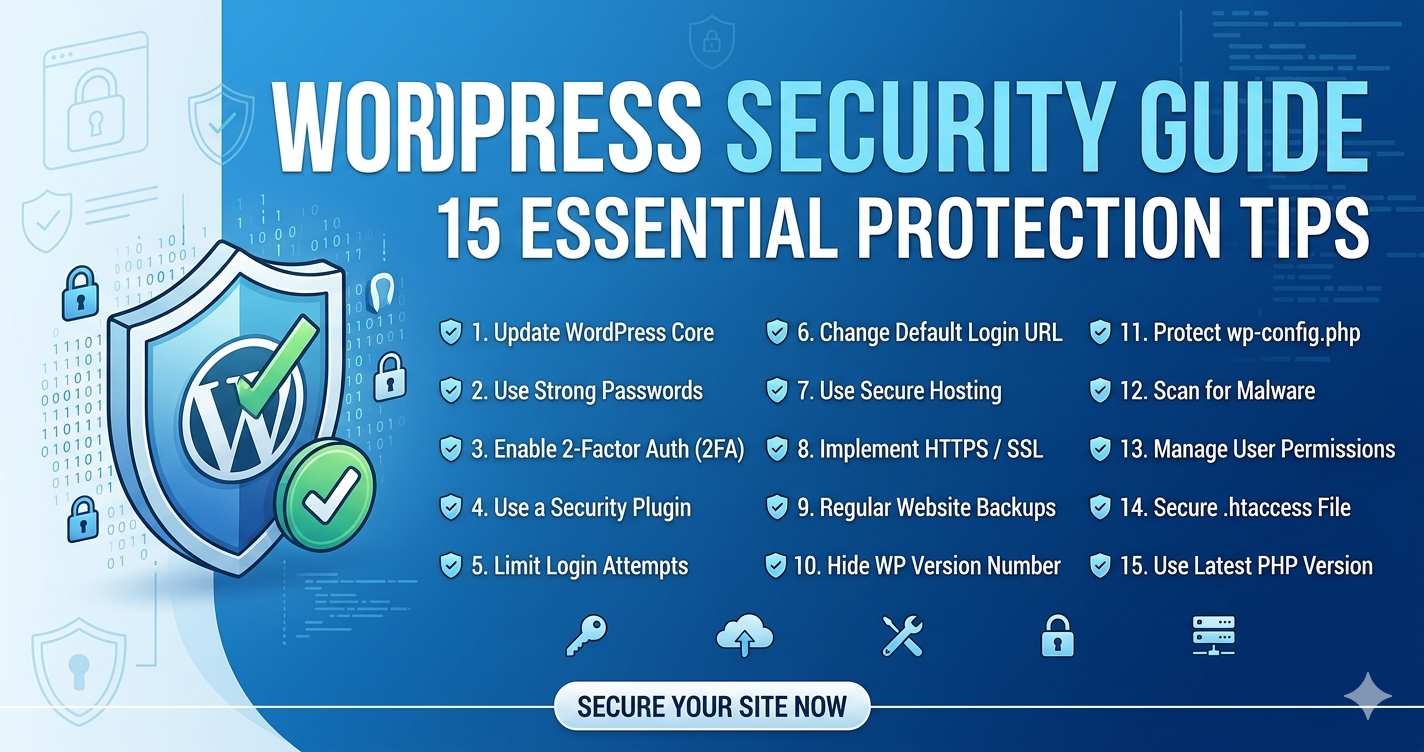
In this guide, you’ll discover 15 proven steps to secure your WordPress site in 2026. These practical and effective security measures will help you protect your website from hackers, strengthen your defenses, and keep your data safe. Whether you’re a beginner or an experienced site owner, this checklist will give you the confidence to stay one step ahead of cyber threats.
Why WordPress Security Matters More Than Ever
Hackers and malicious actors are relentless in their attempts to gain access to websites and their sensitive data. The result? We are currently seeing an unprecedented amount of cybersecurity attacks. To put it in perspective, Wordfence blocked more than 100 billion password-spraying attacks in 2023, and it is estimated that an average of 30,000 new websites are hacked every day. It is an issue that affects businesses of all sizes. Many ransomware attacks target large companies for a bigger payoff, but small and medium businesses are easier targets for hackers due to their limited resources and security expertise. In fact, 43% of online attacks now are aimed at small businesses, and what’s worse is that only 14% of those businesses are prepared to defend themselves.
Cyber threats have evolved beyond simple exploits; we’re now dealing with generative AI that crafts hyper-personalized phishing campaigns and automated vulnerability scanners that probe sites in real-time. According to recent reports, WordPress sites experienced a 28% spike in attacks compared to 2025, with SQL injections and zero-day exploits leading the pack. High-profile breaches, like the one affecting a major e-commerce plugin ecosystem earlier this year, underscore the risks: stolen customer data, SEO penalties from Google for compromised sites, and irreversible reputational damage.
WordPress security in 2026 is fundamentally about building resilience. This approach frees you to prioritize innovation and growth, rather than being constantly occupied with security breaches. Given that automated attacks now account for 70% of all threats, taking proactive steps—like those outlined in this guide—is essential to maintaining a competitive edge. It’s time to put these concepts into practice with our efficient 15-minute checklist.
Why WordPress Security Is Critical?
WordPress powers millions of websites worldwide, which makes it a prime target for hackers. Even a small vulnerability — such as outdated plugins, weak passwords, or poor hosting security — can expose your site to malware, data breaches, and brute-force attacks. A compromised website can lead to lost customer trust, SEO penalties, blacklisting by search engines, and serious financial damage.
That’s why strong WordPress security is critical — it protects your data, your visitors, and your brand reputation while ensuring your website stays online and performs reliably.
Your reputation and information are protected
An issue with a data breach can result in the release of public data, identity theft, ransomware, or the failure of servers. Your business’s growth and reputation are not well served by these events. Most of them are a waste of time, money, and effort.
It is expected by your visitors
Business growth brings an increase in problems to solve. The security of your customers’ information is one of those issues. If you fail to provide this fundamental service right from the start, you will lose your customers’ trust. You’re caught in a catch-22: If your security measures work, your customers won’t even need to know about them.
Google prefers secure websites
There has long been a connection between website security and visibility in Google (and other search engines). In order to maintain a high-ranking website, you need to keep your WordPress website secure.
Making sure WordPress is up-to-date
Regular updates and maintenance are required for WordPress to remain open-source software. Minor updates are automatically installed by WordPress by default. The update must be initiated manually for major releases. Ensure that the theme, plugins, and core of your WordPress site are all up-to-date.
15 Steps To Prevent Attacks On Your WordPress Website
Just like there are ways to clean up the mess created by hackers, there are also ways to prevent these attacks. You will feel relaxed after knowing that these measures are neither time-consuming nor tough to implement. All you need is the determination to implement the required measures!
Step 1: Keep Your WordPress Updated
This is probably the easiest thing that you can do to prevent attacks on your site. Keep all the WordPress core files and features of your WordPress site updated. This includes WordPress core, WordPress themes, and WordPress plugins. It is recommended that you always use the latest version of WordPress software so that you can reap maximum benefits from it. Moreover, doing so will make your website more secure, as the latest WordPress version is usually more secure.
Give this simple tactic a try, and your site will surely become more secure than ever before!
However, we do realize that keeping your WordPress site updated is an extremely time-consuming task. Being a business manager or owner, you definitely have far more important things to deal with. This is where our role becomes important. You can reach out to u,s and we will ensure that your website is regularly updated.
Step 2: Use Strong Passwords And User Permissions
Passwords are one of the essential elements of a website. They play a crucial role in making a site safe and secure. Mostly, hackers steal passwords to gain access to websites. You can give hackers a tough time by using strong and unique passwords; passwords that no one else except you can guess. Businesses are usually reluctant to use difficult passwords because they are afraid that they might forget them. You do not need to worry about memorising the passwords anymore. There are password managers available in the market that perform this duty on your behalf.
One of the very first things you can do to protect your site is use strong passwords for all your logins. It might be tempting to create or reuse a familiar or easy-to-remember password, but doing so puts both you and your website at risk. Improving your password strength and security decreases your chances of being hacked. The stronger your password, the less likely you are to be a victim of a cyberattack.
Step 3: Use 2 Factor Authentication For Login
For logging in to your WordPress site, you only need to enter your username and password. However, doing so does not guarantee a high level of safety. To increase the security of your WordPress site, it is recommended that you enable Two-Factor Authentication (2FA). You can do so by installing a relevant plugin.
Two-Factor Authentication comes in various forms. For instance, you can make your site email you a one-time authentication code that you will be required to enter every time you decide to log in. Moreover, you can even make your website use a reliable app like Google Authenticator to formulate unique codes.
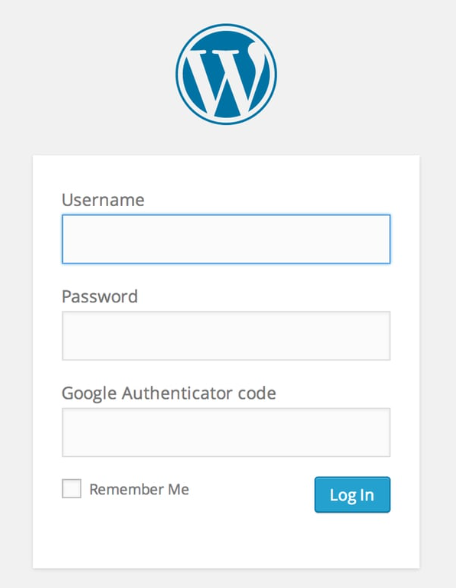
The best aspect of this feature is that it makes it impossible for anyone else to log in to your website, even if they know the username and password. The reason is that accessing the site requires a unique code that has limited access. This feature even gives you some time to update your password in case someone is trying to gain access to your account fraudulently.
Apart from this, we recommend our customers install WordPress security plugins such as Wordfence to further increase the safety of their site.
Step 4: Limit Login Attempts
By default, WordPress allows unlimited login attempts, making it easier for hackers to guess your password through brute force attacks. Install a plugin that limits the number of login attempts and temporarily locks out IP addresses that exceed the limit. We recommend you use the login attempts limiter WordPress security plugin in order to prevent unauthorised people from attempting to log into your website.
Attackers might try to log into your website with multiple attempts on your domain name login page, so limiting the login attempts is one of the best ways to prevent this.
Step 5: Regularly Back Up Your WordPress Website
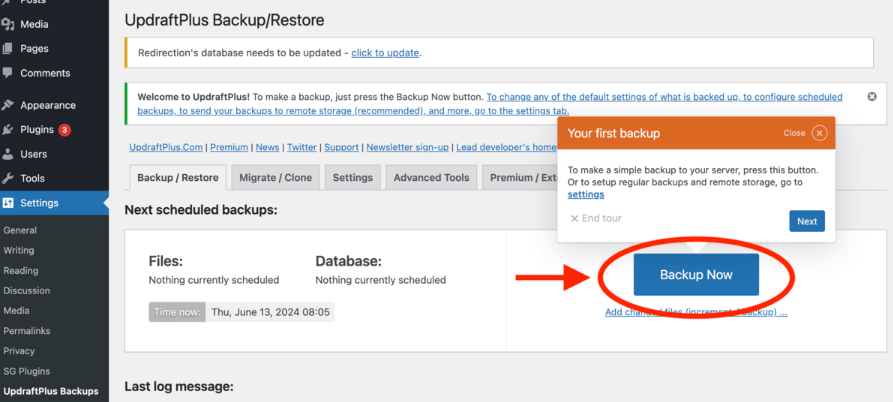
Backing up your website is the most basic technique to secure your WordPress website from attacks. Regularly backing up your WordPress site will help you to restore your website after any sort of incidents like attacks or even physical damage. Even if your website is not attacked by hackers, you may need backups before editing your website in case anything breaks.
You can do this on your website using backup plugins like UpdraftPlus and All-in-One Migration. Back up your entire website with all of its files, database, and records so that you can restore your website fully in case of attacks. You can choose to store your backups anywhere, including your local computer and Google Drive.
Step 6: Enable SSL/HTTPS: Encrypt Everything
One of the essential initial steps to securing your website is implementing a Secure Sockets Layer (SSL) certificate. This standard technology establishes an encrypted connection between your web server (host) and a web browser (client), ensuring that all transmitted data remains private and intact.
Millions of websites use SSL certificates as an industry standard to protect online transactions and safeguard customer communications. Obtaining and configuring an SSL certificate from a trusted Certificate Authority (CA) is crucial.
The SSL certificate encrypts data, such as sensitive login credentials and personal information, passed between the user’s browser and your site. This encryption makes it significantly harder for hackers to infiltrate your site and steal information. Once SSL is installed, your website will automatically begin using HTTPS instead of HTTP.
Step 7: Hide Login URL
By default, your WordPress URL is “yoursite.com/wp-admin ”. If you decide to leave it as is, remember your site will become prone to security attacks. In order to prevent such attacks, it is advisable to change your WordPress login URL or add a couple of security questions for your key pages.
On top of that, you can even add two-factor authentication, which has been discussed above in this article. You can even check for the IP address that has made the largest number of failed login attempts and then block that IP address from your site.
Step 8: Make Sure WordPress Files Have The Correct Permissions
WordPress’s files are protected by file permissions on the operating system that hosts them; these rules determine how files can be read, edited, and executed. In particular, shared hosting requires this measure of security.
The wrong setting can allow attackers to read any content on your website – specifically, wp-config.php – when one of your websites on shared hosting is hacked.
- All files should be 644.
- All folders should be 775.
- wp-config.php should be 600.
Files and folders can be modified, deleted, and read by the web server (WordPress) and your hosting account (user account).
Wp-config.php cannot be read by other users. You may need to alter wp-config.php to 640 or 644 if setting 600 takes your website down.
Step 9: Remove unused themes and plugins
Any unused themes and plugins should be removed to increase WordPress security. These plugins and themes are especially harmful if they are not updated on time. Unused and outdated are one of the common entry points for attackers to get into your WordPress website.
Firstly, deactivate any WordPress theme or plugin you do not want to use, and then delete them. This will also reduce the size of your WordPress website.
Step 10: Update the PHP file and version
Updating your PHP version to the latest is crucial to your website security. WordPress sites require you to update the PHP version whenever a new version is available. You can do so by navigating to the WordPress Dashboard or through your website hosting provider.
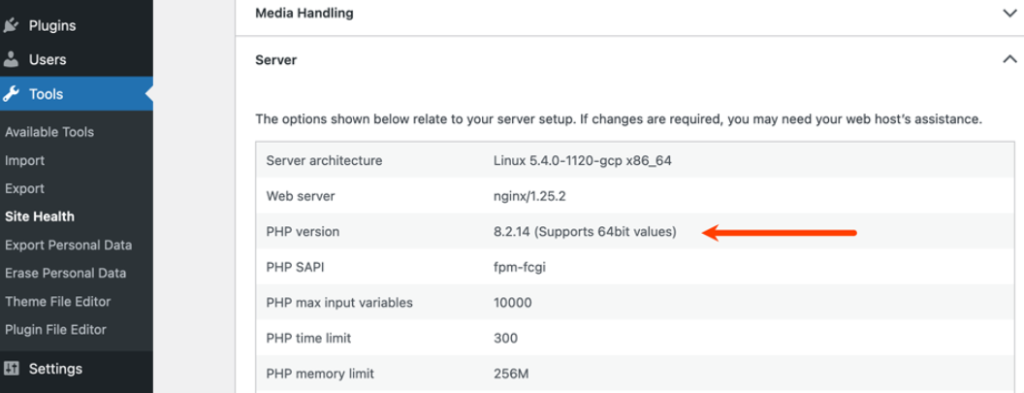
You can also ask your hosting provider or webmaster to do this for you. Regularly updating the PHP version ensures you have all the new WordPress security upgrades and that your site is secure.
Step 11: Do not use the default WordPress admin account
WordPress’s default username is Admin, and attackers will have no problem guessing it if you use it. Basically, using ‘Admin’ is like handing the bad guys the first half of your credentials for free. It makes their job way easier—they only have to figure out the password, which dramatically speeds up their chances of breaking in. Plus, if they get that username, they can use it to dig up more info, like checking author archives or figuring out your email format, to launch a more focused, nastier attack on you or other high-level users.
You absolutely need to use a different, less obvious username. This is a must-do thing. Either do it right when you set up a new site, or change it on your existing one (which usually means messing with the database or using a plugin, since WordPress locks down direct username changes). Pick a complex, unique name that isn’t connected to your site’s brand or your actual name. It’s the simplest first defense against unauthorized access and makes it much, much harder for anyone to steal your login details.
Step 12: Use Firewalls, Scan for Malware and Vulnerabilities
Using a firewall plugin for your website makes sure that the spammy/harmful traffic to your sites will be blocked before it reaches your website. Firewalls help you protect your site from all major sorts of WordPress security breaches like database injections, cross-site scripting, and file inclusions.
Try out some of the best popular firewall plugins for your websites:
Use plugins and tools to scan for vulnerabilities on your WordPress website. There are plenty of plugins that will auto-run checks for any WordPress security issues that your website may be susceptible to. You can also manually run the checks and scans if you think anything is not in place.
Step 13: Auto Log-out Idle Users
If any user is idle, then the WordPress session for that user should be ended, requiring them to log in again in order to gain access to the WordPress dashboard. Chances of attacks may increase if a user leaves the desk without logging out.
This prevents unauthorized access if a legitimate user leaves their device unattended while logged in, which otherwise allows opportunistic individuals to potentially gain control, change settings, install malicious code, or lock out the owner.
The most effective way to implement this is with a plugin like the Inactive Logout plugin. These tools allow administrators to define the maximum inactivity duration before a forced log out, often tailored by user role (e.g., shorter timeouts for Administrators). Enforcing automatic session timeouts significantly hardens your WordPress site against attacks from unattended devices.
Step 14: Disable XML-RPC
WordPress, in its quest to offer extensive functionality and integration with various software clients, incorporates an implementation of the XML-RPC (XML Remote Procedure Call) protocol. This protocol allows applications outside of your WordPress installation, such as desktop or mobile blogging apps, to interact with your site (e.g., publishing posts, editing content, managing comments).
However, for the vast majority of WordPress users, the XML-RPC functionality is unnecessary, and perhaps more importantly, it represents a significant and increasingly common security vulnerability. In recent years, XML-RPC has become a primary vector for attacks, opening up WordPress sites to several major exploits:
- DDoS and Brute-Force Attacks (Pingbacks): The xmlrpc.php file can be exploited for Distributed Denial of Service (DDoS) attacks. Attackers can leverage the pingback feature within XML-RPC to send a massive number of requests to a target site, overwhelming its resources and taking it offline. Furthermore, a single XML-RPC request can bundle hundreds or even thousands of username and password attempts, making brute-force login attacks much faster and more efficient than standard login attempts.
- Vulnerability Exploitation: While the protocol itself is not inherently insecure, weaknesses in its implementation or in how it interacts with other plugins can create backdoors that hackers exploit to gain unauthorized access, upload malicious files, or execute remote code.
Given that most users rely solely on the browser-based WordPress dashboard for all site management and do not utilize external clients, retaining the XML-RPC functionality presents an unacceptable security risk with no corresponding benefit. It is therefore strongly recommended that site administrators disable the XML-RPC protocol entirely.
Fortunately, achieving this critical security measure is straightforward. Tools like the Wordfence Security plugin offer a user-friendly way to completely block or strictly limit access to the xmlrpc.php file. By deploying such a security solution, users can easily neutralize this major threat vector, significantly bolstering the security posture of their WordPress installation against common hacking attempts. Disabling XML-RPC is one of the essential, low-effort steps site owners can take to safeguard their site against malicious exploitation in 2026 and beyond.
Step 15: Create a CAPTCHA for Login & Registration
You’ve already made life for hackers a lot harder when you secure your website with HTTPS and use strong passwords.
It can be made even harder by adding CAPTCHA to the login form. A CAPTCHA protects your login forms from brute-force attacks. This measure is highly effective because it introduces a simple human verification step that is difficult for automated scripts (bots) to pass.
Modern CAPTCHA implementations, such as Google’s reCAPTCHA, are often non-intrusive (“I’m not a robot” checkboxes) or even invisible, making the experience smooth for genuine users while effectively blocking malicious traffic. Adding CAPTCHA to your login, registration, and comment forms drastically reduces the success rate of automated attacks, spam, and bot-driven credential stuffing attempts.
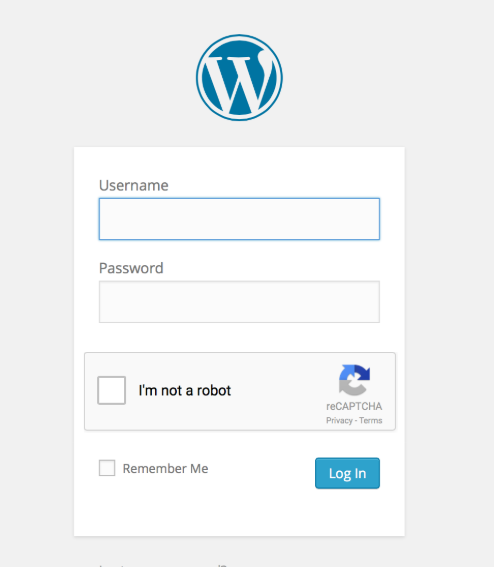
You can easily implement this using popular plugins like reCAPTCHA by BestWebSoft or by utilizing the built-in CAPTCHA functionality often provided by comprehensive security suites (like Wordfence or Sucuri).
Some Advanced Security Tips: Future-Proofing Your WordPress Site
The checklist gets you 80% there, but for enterprise-level resilience, layer in these 2026-specific strategies. Drawing from expert guides, focus on AI integration and performance-security synergy.
- Implement a Web Application Firewall (WAF): Beyond plugins, use Cloudflare’s edge WAF for AI-driven zero-day blocking. Cost: Free tier suffices for most.
- Geo-Blocking and Rate Limiting: Block high-risk regions with Sucuri; limit REST API calls to thwart abuse.
- AI-Powered Monitoring: Tools like Jetpack Protect use ML for anomaly detection alerts on unusual traffic spikes.
- User Role Zero-Trust: “Members” plugin for dynamic roles; audit logs via “WP Activity Log”.
- Offsite Malware Scans and Optimization Tie-Ins: Weekly external scans; combine with caching (WP Rocket) for secure speed, 95% threat reduction.
- Quantum-Ready Encryption: Upgrade to post-quantum algos in SSL via providers like Sectigo.
If you want to know how to Fix 404 Not Found Error on WordPress, then click here.
Where do WordPress security attacks originate?
Despite being the most popular Content Management System (CMS), WordPress is a frequent target for cyberattacks, often due to unpatched vulnerabilities, phishing, and weak login security. Securing a website is more critical than ever.
The high volume of successful WordPress compromises is rarely due to core platform flaws, but rather user oversight. The main issue is the failure to keep the WordPress core, plugins, and themes updated. A Sucuri statistic highlights this: “50.3% of infected WordPress websites were outdated,” making current software the most effective security measure.
The WordPress community regularly releases updates to fix vulnerabilities, address bugs, and improve performance. Consequently, all site owners must consistently implement reliable update practices to ensure the ongoing safety, stability, and optimal performance of their WordPress environment. This vigilance is the primary defense against digital threats.
Best WordPress Security Plugins
WordPress is undoubtedly one of the most popular platforms for building your website, powering over 40% of websites. While its usage increases exponentially, so does the threat of attacks. Attackers are constantly trying to exploit vulnerabilities in websites. Fortunately, there are WordPress security plugins to secure your WordPress site from these attacks.
These plugins are tried and tested to help you protect your website from malicious attacks like brute force attacks and sensitive data access.
What to do if your WordPress website is hacked or attacked?
Don’t panic if your WordPress site is hacked. There are a series of steps you can take to recover your hacked WordPress website. You can still recover your website and get it back to full functionality. To do this, follow the steps listed below:
- Try to get your website’s backup file. If you do not have the backup file, chances are your web hosting provider might have one.
- Restore your website from the backup file if possible. Do a clean WordPress installation, including all plugins and theme files.
- Try to repair your site using plugins and security tools to detect if there is any malware.
- You can check your activity logs to know what actually caused this hack.
- Delete suspicious user accounts and recover WordPress passwords.
- Remove all unused extensions, plugins, and themes.
If you are unsure how to implement this security measure, you mustn’t delay. You should contact your web hosting provider immediately for assistance. They possess the technical expertise and access necessary to guide you through the process or, in many cases, perform the necessary steps for you.
People Also Ask About WordPress Security
Here are the answers to some of the most frequently asked questions about maintaining the security of your WordPress website.
Is WordPress secure in 2026?
Yes, WordPress is secure when properly maintained. Most security issues happen due to outdated plugins, themes, weak passwords, or poor hosting—not the core WordPress software itself.
Can I secure my WordPress site without using plugins?
Yes, while plugins provide convenient security features, you can also enhance your site’s security manually by following best practices, such as using strong passwords, limiting login attempts, and securing your hosting environment. However, using reputable security plugins can simplify the process and offer additional features.
Can I recover my WordPress site if it gets hacked?
If your WordPress site gets hacked, having regular backups in place is essential for recovery. You can restore your site to a previous clean state by using the latest backup. However, it’s recommended to work with a professional or seek assistance from a cybersecurity expert to identify the source of the breach, close any vulnerabilities, and ensure that your site remains secure.
What is the most common way WordPress sites get hacked?
The most common causes are outdated plugins/themes, weak login credentials, nulled themes, and a lack of security monitoring.
Can shared hosting affect WordPress security?
Yes. Poor-quality shared hosting can increase security risks. Choosing a secure and reliable hosting provider significantly improves protection.
Don’t Wait Until You Get Hacked
Securing your WordPress site from hackers is crucial to protect your data, maintain your reputation, and ensure the smooth functioning of your website. By following the 15 steps outlined in this article, you can significantly enhance your site’s security posture. Remember to keep your WordPress installation and plugins up to date, use strong passwords and two-factor authentication, implement security plugins and a web application firewall, regularly back up your site, and stay informed about the latest security practices.