

OpenAI launched ChatGPT in 2022, and by 2024, it crossed 200 million monthly active users. This rapid and substantial growth is a testament to global confidence in and the tool’s utilization across various domains, including writing, coding, data analysis, and education. Although ChatGPT is extremely powerful, it still has some limitations. This is where ChatGPT plugins help. Plugins add new features, making ChatGPT smarter and more useful.
Modern web development is no longer limited to writing code manually. Developers are increasingly relying on AI-driven plugins to automate repetitive tasks, analyze code quality, generate documentation, and even troubleshoot complex bugs. For example, many developers now use AI tools to quickly generate boilerplate code for frameworks like React, debug backend APIs built with Node.js, or optimize database queries in MySQL. These plugins can dramatically reduce development time and help teams ship products faster.
In real-world development environments, time efficiency and productivity are critical. Whether you are building a small portfolio website, maintaining an e-commerce platform, or developing a large SaaS application, the right ChatGPT plugins can streamline your workflow and eliminate many manual processes.
In this article, we will explore the Top 10 ChatGPT Plugins For Web Developers in 2026 that can help you code faster, solve problems more efficiently, and improve your overall development productivity.
What Are ChatGPT Plugins?
Before looking at the list, it’s worth asking: what are ChatGPT Plugins?
ChatGPT plugins are additional tools you can add to ChatGPT to strengthen it. Think of them like apps on your mobile phone. Your phone works properly on its own, but apps give it more power. In the same way, plugins improve ChatGPT.
ChatGPT plugins help the AI to:
- Get real-time data from the internet
- Connect to other apps and tools
- Do calculations and data analysis
- Work with emails, files, and calendars
These plugins solve a major problem for AI. ChatGPT is trained on old data, so it may not know the latest news. Plugins help it access fresh information and external services.
Because of this, ChatGPT plugins for developers are very helpful. Developers can build smarter apps, automate tasks, and save time. Many businesses now use plugins with ChatGPT integration services and ChatGPT development services to improve productivity.
Key Statistics of ChatGPT Users for 2026
ChatGPT has grown incredibly fast since its launch. In just five days, the platform surpassed 1 million users, showing how quickly people embraced this AI tool. Today, ChatGPT.com receives around 5.6 billion visits every month, which reflects its massive global popularity.
Every day, users send over 2.5 billion prompts to ChatGPT, using it for tasks like writing, coding, learning, and general queries. Social media also plays a big role in spreading ChatGPT’s reach, about 47% of its social media traffic comes from YouTube, highlighting the popularity of video tutorials and demos.
Geographically, approximately 18% of ChatGPT users are from the United States, and a significant portion of the user base is young, with around 42% under 25. This shows that ChatGPT appeals not only to professionals and businesses but also to students and younger audiences.
Although the growth slowed slightly toward the end of 2025, OpenAI aims to reach 1 billion users by 2026, making ChatGPT one of the fastest-growing AI platforms in history. These statistics clearly demonstrate ChatGPT’s widespread adoption and influence in the AI landscape.
How to Use ChatGPT Plugins
Using plugins is easy once you know where to look.
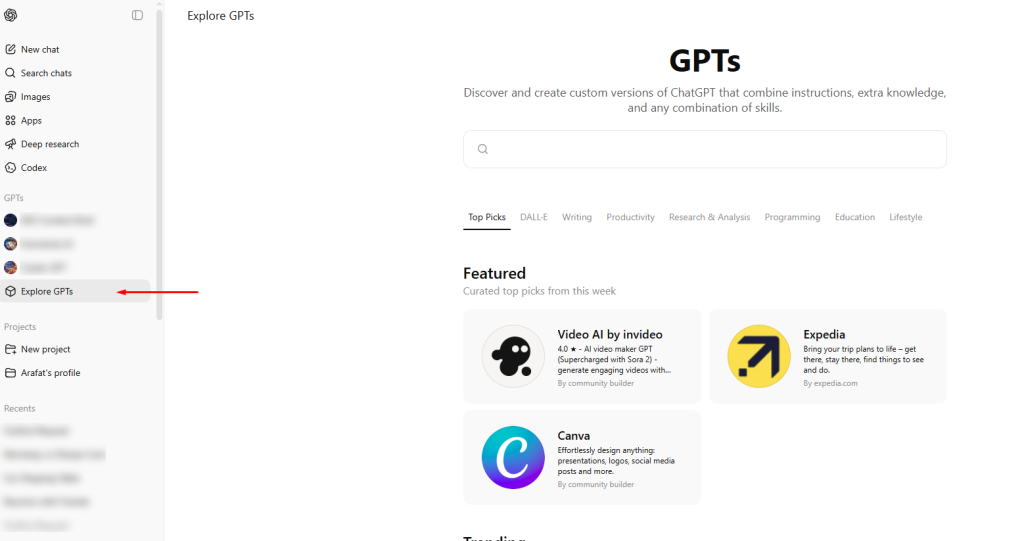
- Upgrade to ChatGPT Plus (or another approved plan). Paid plans let you use advanced GPTs with built-in plugins/tools.
- Open the GPT Store and browse for the GPT you need. Different GPTs are built for different use cases — travel booking, math/logic/analysis, coding help, design, research, etc.
- Pick the GPT you want and start chatting. That GPT already knows which external tools it can call (for example: web search, data analysis, booking APIs, creative tools).
- You don’t have to manually enable multiple plugins anymore. You choose the GPT “type” that fits your task, and it brings the right capabilities with it.
Type your request in plain language, and GPT will automatically use its allowed actions. Some GPTs may ask you to sign in or grant access to certain services (for example, to connect an API or account). Only approve access you trust, especially for anything sensitive.
Remember: each plugin may require separate login credentials or permissions. Always review what kind of access it requests, especially if it involves sensitive data.
How to Choose the Best ChatGPT Plugin?
The abundance of ChatGPT plugins, released almost monthly, can make it challenging for web developers to select the best one. However, finding the right plugin for your specific needs is straightforward if you follow a few simple steps.
Understand Your Goals
Start by identifying what you want ChatGPT to help you with. Whether you need help with writing, coding, data analysis, or design, knowing your goal helps you choose the right ChatGPT plugins to deliver the results you need.
Check Compatibility
Always make sure the plugin works smoothly with your browser, tools, and daily workflow. This step is crucial for businesses using ChatGPT integration services to avoid technical issues or workflow disruptions.
Choose Easy-to-Use Plugins
Select simple, user-friendly plugins. A good plugin should be easy to learn and should help you complete tasks quickly without confusion.
Focus on Security and Privacy
Before installing any plugin, read its privacy and security policy carefully. Make sure it protects your data, especially when you upload files or share sensitive business information.
Look for Community Support
Plugins with a large user base usually perform better and receive regular updates. Strong community support is very helpful for developers and businesses that need quick help and reliable tools, as well as for ChatGPT plugins.
Best 10 ChatGPT Plugins You Should Try
Below are the top ChatGPT plugins that are widely used in 2026. These plugins help users work faster, think better, and automate daily tasks. They are useful for students, developers, creators, and businesses using AI development services.
1. Code Interpreter
Code Interpreter is an advanced, built-in capability (now often referred to as ‘Advanced Data Analysis’ or integrated into GPT-4) that allows ChatGPT to write and execute Python code in a sandboxed environment.
This capability enables ChatGPT to:
- Analyse Data: Upload and analyse spreadsheets, charts, and datasets.
- Perform Math/Calculations: Solve complex mathematical problems.
- Handle Files: Edit files, perform format conversions, and generate new files (like graphs).
- Generate Visualisations: Create charts and graphs from uploaded data.
- Debug/Test Code: Write, run, and debug small snippets of Python code directly.
For web developers, it is particularly useful for tasks like analyzing performance data, converting file formats (e.g., JSON to CSV), or quickly generating a visual representation of an algorithm’s output.
Usefulness
This plugin enables ChatGPT to run Python code directly inside the chat. You can upload files such as CSV, PDF, or images and ask ChatGPT to analyze, clean, or process the data. It handles calculations, charts, and summaries without switching tools.
Benefits
It saves time by removing the need for coding software or external tools. You can quickly get charts, insights, and calculations in one place. This makes data work faster and easier.
Best Use Case
Developers, students, researchers, and data analysts who work with numbers and files regularly. It is one of the best ChatGPT plugins and is highly recommended among ChatGPT plugins for developers.
2. Zapier
Zapier is a powerful automation plugin that connects ChatGPT to over 6,000 other applications, including Google Sheets, Slack, Gmail, and thousands of other web services.

This plugin allows developers to automate tasks directly from a chat prompt. For example, you can ask ChatGPT to:
- Add a new row to a Google Sheet when a certain condition is met.
- Send a Slack notification to your team when a bug is reported in your ticketing system.
- Draft and send an email based on a summary of a document.
Usefulness
It acts as a bridge, allowing ChatGPT to trigger actions and workflows in thousands of third-party apps without writing custom API code. It turns conversations into automated actions.
Benefits
It dramatically increases productivity by automating repetitive tasks such as data entry, notifications, and communication, freeing developers to focus on core coding.
Best Use Case
Developers, project managers, and anyone needing to connect their ChatGPT workflow with external business applications for real-time automation and data exchange. It’s a key tool for ChatGPT development services focusing on integration.
3. Wolfram
Wolfram is a sophisticated computational knowledge engine and plugin that gives ChatGPT access to powerful capabilities in mathematics, data analysis, physics, and real-time information far beyond those of standard GPT models.

This plugin transforms ChatGPT into a tool capable of solving complex equations, accessing vast scientific and real-world databases, and performing advanced calculations with high accuracy.
Usefulness
It provides expert-level computation, accurate mathematical problem-solving, data visualization, and access to up-to-date, real-world data across science, engineering, geography, and more. It serves as a dedicated super-calculator and knowledge base.
Benefits
For web developers working on scientific applications, gaming physics, data-driven visualizations, or complex algorithms, Wolfram ensures the mathematical and data outputs are accurate and reliable, saving time compared to manual calculation or searching specialized documentation.
Best Use Case
Engineers, data scientists, and students who frequently need accurate, complex calculations, statistical analysis, or access to validated scientific and real-time data within their ChatGPT workflow.
4. Canva
Canva is a popular graphic design platform, and its ChatGPT plugin brings basic design and visualisation capabilities directly into your chat workflow. While web developers primarily focus on code, quick visual assets are often needed for placeholders, mockups, presentations, or even social media promotion of a project.

Usefulness
The Canva plugin lets you generate a variety of visual content—such as presentations, logos, social media posts, banners, and simple design mockups—by simply describing what you want in chat. It then provides a link to an editable Canva template that matches your request.
Benefits
It eliminates the need to switch tools for basic design tasks. Developers can quickly generate a visual representation of an idea, a placeholder image, or a simple graphic for a project readme without needing extensive design skills or complex software.
Best Use Case
Developers, content creators, and project managers who need to quickly generate simple visual assets, mockups, or presentation slides as part of their development or documentation process.
5. DALL·E
DALL·E is a powerful generative AI model from OpenAI that generates photorealistic images and art from natural-language descriptions. While primarily known for artistic creation, the DALL·E capability (now often integrated directly into the GPT-4 model) is incredibly useful for web developers needing unique visual assets, design inspiration, or placeholder images.

Usefulness
It generates high-quality, unique images and artwork based on text prompts. Developers can use it to create specific icons, background textures, mockups of UI components (e.g., “a futuristic login screen in dark mode”), or unique visual representations for error pages or marketing materials.
Benefits
It offers a quick, cost-effective way to generate custom graphics without a designer or generic stock photos. It accelerates the prototyping and visual design phase, allowing developers to create tailored visual components instantly.
Best Use Case
Front-end developers, UI/UX designers, and developers needing custom visual assets, icons, or background images for their applications, prototypes, or documentation. It is an essential tool for rapid visual content creation.
6. AI Humanizer Pro
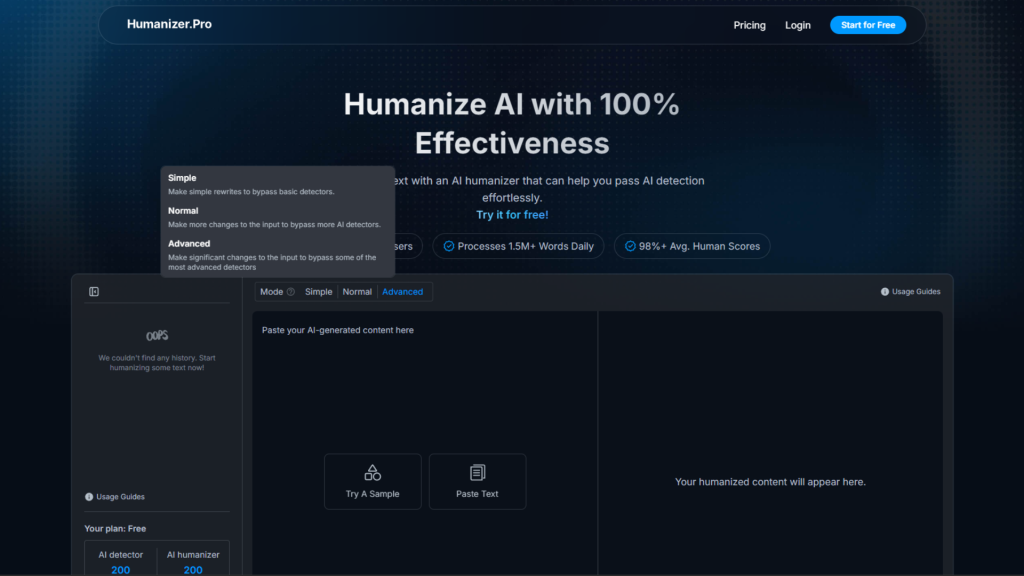
AI Humanizer Pro is primarily a tool for content creators and SEO specialists. Still, it is increasingly relevant to web developers, especially those managing content-heavy sites, blogs, or knowledge bases. Its core function is to rephrase AI-generated text to sound more natural, human-written, and less detectable by AI content detectors.
Usefulness
This plugin takes text, typically generated by an AI model (like ChatGPT itself), and processes it to improve readability, flow, and the subtle nuances that distinguish human writing from machine output. It helps ensure that AI-generated content used on a website maintains a high quality and natural voice.
Benefits
Developers often integrate AI tools to generate boilerplate content, documentation drafts, or marketing copy for their projects. Using AI Humanizer Pro ensures that this quick content doesn’t sound robotic or generic, thus maintaining brand consistency and improving reader engagement on the developed platform.
Best Use Case
Web developers managing content generation pipelines, technical writers drafting documentation, and developers using AI to generate blog posts or marketing materials, but who need to ensure the final tone is professional and human-like.
7. AskYourPDF
AskYourPDF is a powerful productivity plugin that interacts with and extracts information from PDF documents directly within the ChatGPT interface. While seemingly simple, this tool is invaluable for developers who constantly deal with documentation, technical specifications, white papers, and complex API guides, which are often provided in PDF format.

Usefulness
This plugin allows users to upload a PDF file (via a link or a direct upload) and then ask ChatGPT specific questions about its content. Instead of manually scanning a lengthy document, AskYourPDF enables AI to “read” the file and instantly pull summaries, key points, or specific answers to a developer’s query.
Benefits
It drastically reduces the time spent on research and documentation review. Developers can quickly understand complex standards, troubleshoot issues based on vendor manuals, or extract crucial configuration details from lengthy documents without ever leaving the chat environment. It turns static PDF documentation into an interactive knowledge base.
Best Use Case
Developers, technical architects, and engineers who frequently work with API documentation, software specifications, design documents, and regulatory white papers are provided in PDF format. It accelerates the information retrieval process for complex technical documents.
8. AIPRM for ChatGPT
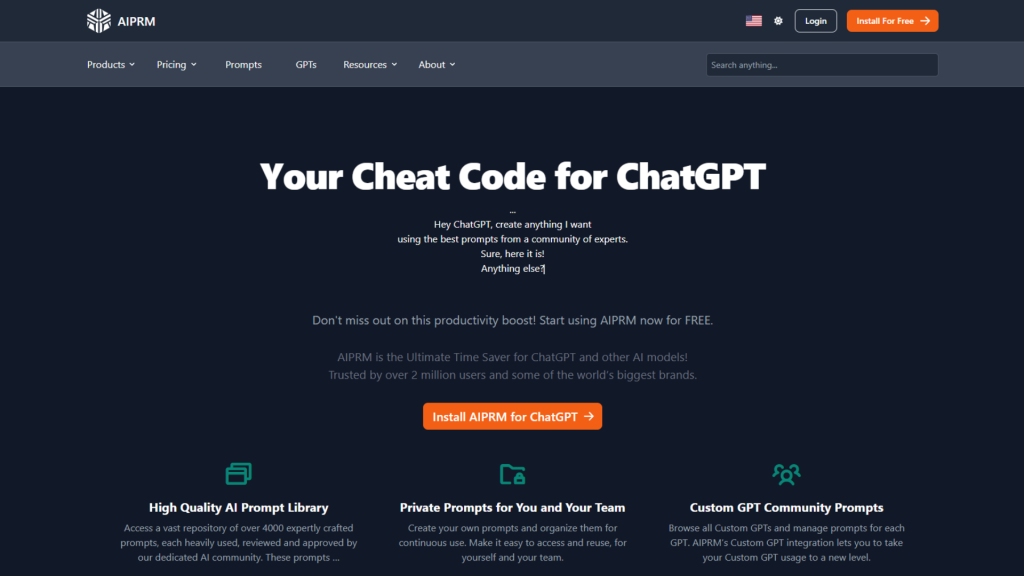
AIPRM (AI-Powered Prompt Management) for ChatGPT is a browser extension that provides a large catalog of curated, one-click prompt templates optimized for various tasks like SEO, content creation, copywriting, and marketing.
Usefulness
AIPRM adds a library of ready-made prompt templates to ChatGPT. These templates are designed for SEO, marketing, and content writing tasks.
Benefits
You don’t need to create prompts from scratch. You can select expert-built templates and get high-quality results instantly, saving time and effort.
Best Use Case
SEO experts, bloggers, marketers, and copywriters who want fast, consistent, and reliable content ideas.
9. Prompt Perfect Plugin
Prompt Perfect is a utility plugin designed to optimize user input before it is sent to the ChatGPT model. It acts as an intermediary, taking a user’s initial, sometimes vague or poorly structured, prompt and rewriting it into a highly detailed, clear, and context-rich prompt that maximizes the quality of the AI’s response.
Usefulness
When activated (usually by starting a prompt with a specific keyword or command), the plugin automatically processes the user’s input. It identifies missing details, clarifies ambiguities, and structures the request to align better with how the GPT model processes information, leading to more accurate and useful outputs (e.g., better code snippets, more precise explanations, or higher-quality content).
Benefits
Developers often need highly specific, technical outputs. Prompt Perfect ensures that even a hurried or non-expert prompt yields a quality response, reducing the need for multiple attempts and refinements. It maximizes efficiency when interacting with the AI, especially for complex coding, debugging, or analytical tasks.
Best Use Case
Any developer or AI user looking to consistently receive high-quality, precise outputs from ChatGPT. It is particularly useful when dealing with complex, multi-step queries or when seeking highly nuanced technical details.
10. Code Copilot
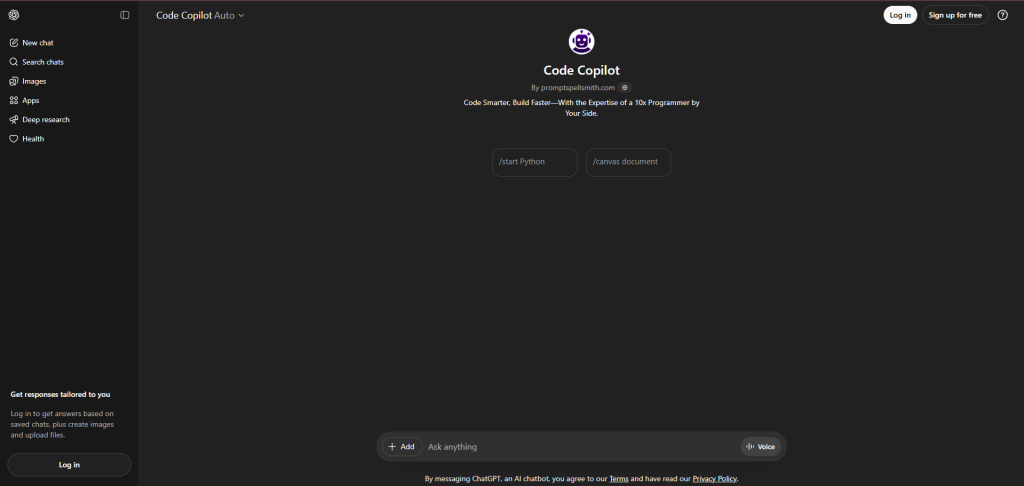
Code Copilot is a plugin (often a conceptual stand-in for specialised coding helper GPTs) that focuses on code generation, refinement, and language translation. It is tailored to the day-to-day needs of developers who are constantly switching between languages and frameworks.
Usefulness
It can generate code snippets based on function descriptions (e.g., “Write a Python function to parse a JSON file”), translate code from one language to another (e.g., “Convert this JavaScript fetch request to a Node.js axios request”), or refactor existing code for better performance or readability. It can also analyze code errors and suggest fixes.
Benefits
It significantly speeds up the coding process, especially when working with unfamiliar libraries or performing repetitive setup tasks. It also serves as an excellent resource for quick, cross-language reference, saving time that would otherwise be spent searching documentation for syntax or specific implementation patterns.
Best Use Case
Full-stack developers, software engineers, and anyone involved in the creation, maintenance, or translation of source code across multiple programming languages and environments.
Why These Are the Best ChatGPT Plugins Right Now
The best “top plugin” lists are often just recycled names. Our selections are different because they measurably boost productivity:
- Reduce Context-Switching: Minimize the need to jump between different tools.
- Accelerate Decision-Making: Provide instant data for faster choices.
- Automate Manual Work: Save significant weekly hours by handling repetitive tasks.
These plugins are more than just popular; they are practical, proven, and actively used in professional development workflows.
Things Developers Want to Know About ChatGPT Plugins
The following section answers some of the most common questions developers have about using ChatGPT plugins in their workflow. From installation and compatibility to real-world development use cases, these quick answers will help you better understand how to get the most out of ChatGPT plugins in modern web development.
Are ChatGPT Plugins Safe To Use?
Most official ones are reviewed, but use caution with sensitive or personal data. Stick to trusted developers and read their data-handling terms.
Are These Plugins Free?
Some ChatGPT plugins are available for free, while others require a paid subscription. The cost usually depends on the features and usage limits. You can start with free plugins and upgrade later if needed.
Do ChatGPT Plugins Work On Mobile Devices?
Most ChatGPT plugins work on mobile devices via the ChatGPT app or in a browser. However, some advanced features may work better on a desktop. The experience can vary based on the plugin.
Can Using Plugins Slow Down ChatGPT?
Yes, using too many plugins at once can slow down ChatGPT. To avoid this, enable only the plugins you need for your task. This helps maintain smooth performance.
Can I Build My Own Custom Chatbot?
Yes, you can build your own chatbot instead of using ready-made plugins. Custom chatbots give you more control over workflows, features, and responses. This is helpful for businesses with specific goals.
Go FullScale With ChatGPT Plugins for Developers
The rapid growth of ChatGPT has transformed the way developers approach modern web development. With powerful plugins and AI-driven tools, developers can now automate repetitive tasks, analyse data more efficiently, generate code faster, and simplify complex workflows. From automation tools like Zapier to advanced data capabilities such as Wolfram, these plugins are helping developers save time and focus more on innovation rather than manual work.
Using the right combination of ChatGPT plugins can significantly improve productivity, streamline project management, and enhance overall development efficiency. Whether you are debugging backend APIs, designing UI assets, or analyzing performance data, these tools can act as powerful assistants throughout the entire development process.
However, to get the best results from AI-powered tools, developers also need reliable hosting infrastructure to run their applications smoothly. Fast servers, secure environments, and scalable resources are essential for successfully deploying modern web applications.
Ready to launch your next project?
At Gotmyhost, we provide high-performance Domain, Hosting, VPS Servers, Dedicated Servers, and Colocation solutions designed for developers and businesses. Whether you are building a personal website or a large SaaS platform, our hosting solutions give you the speed, security, and reliability you need to grow online.
Explore our hosting services today and power your next web project with confidence. You can visit our guide to find the right web hosting plan.