At Gotmyhost, we aim to make your hosting migration seamless, secure, and efficient. Whether your current hosting account is active or you only have a full cPanel backup, our team is ready to assist you throughout the entire transfer process.
If Your Third-Party Hosting Account Has cPanel and Is Active
If your current hosting provider uses cPanel and the account is active, our technical team can complete the migration for you. To proceed, the following conditions must be met:
- Your existing hosting account must remain active for at least 3 days following the submission of your transfer request. This ensures we have sufficient time to complete the data transfer without interruption.
- You must provide valid access credentials from your old hosting provider for account verification and migration compatibility checks.
- SSH access is recommended as it significantly speeds up the transfer process. If available, please include it in your request.
- Your account and data must comply with Gotmyhost’s Terms of Service.
To begin the transfer, please email [email protected] with your hosting details. Our team will verify your account and guide you through the next steps.
If Your Third-Party Hosting Account Is Not Active but You Have a Full cPanel Backup (Stored on Your PC)
- Visit https://gotmyhost.com and purchase a hosting plan that meets or exceeds the specifications of your previous hosting environment.
- Once your Gotmyhost plan is activated and you receive your Welcome Email, upload the full cPanel backup to your account’s Home directory via:
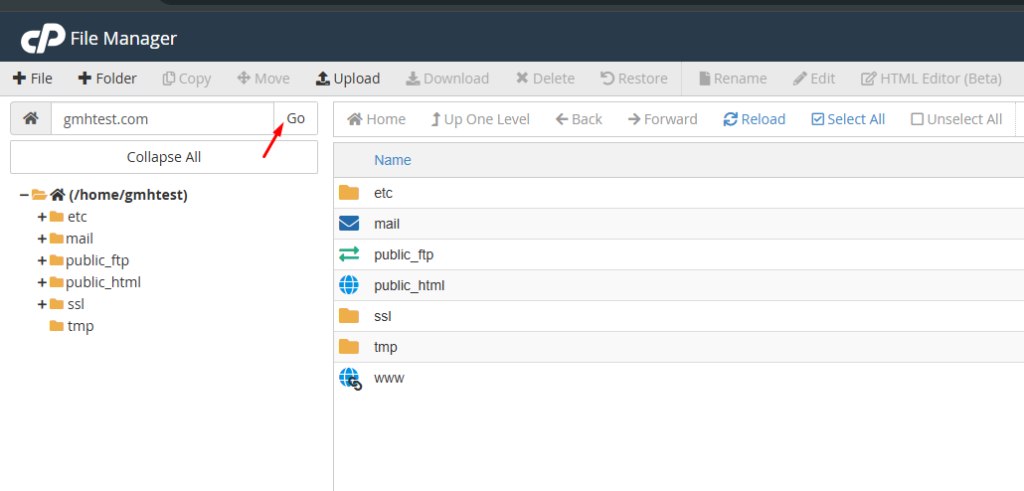
cPanel → File Manager

In Home Directory enter your domain
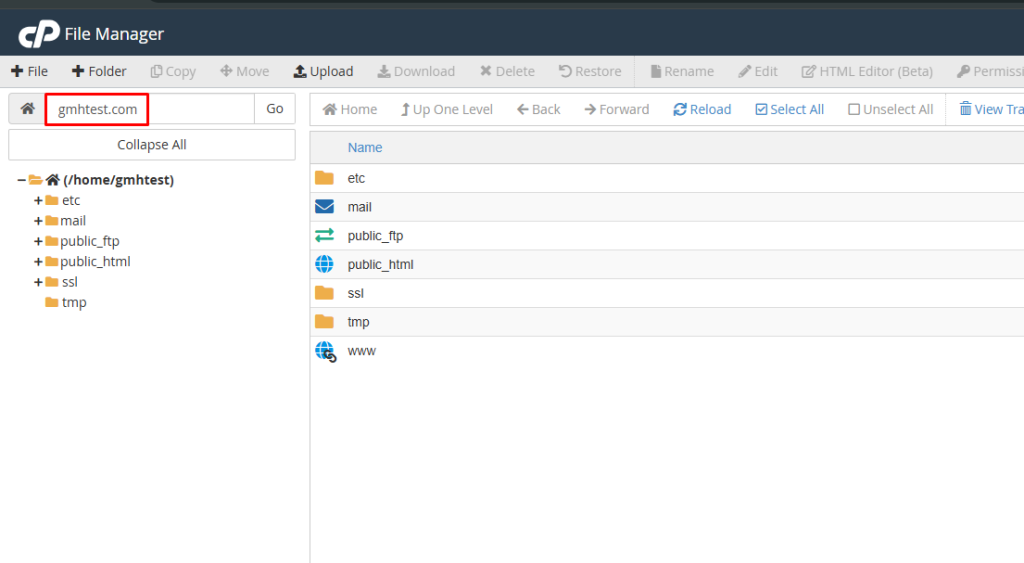
Then press Go
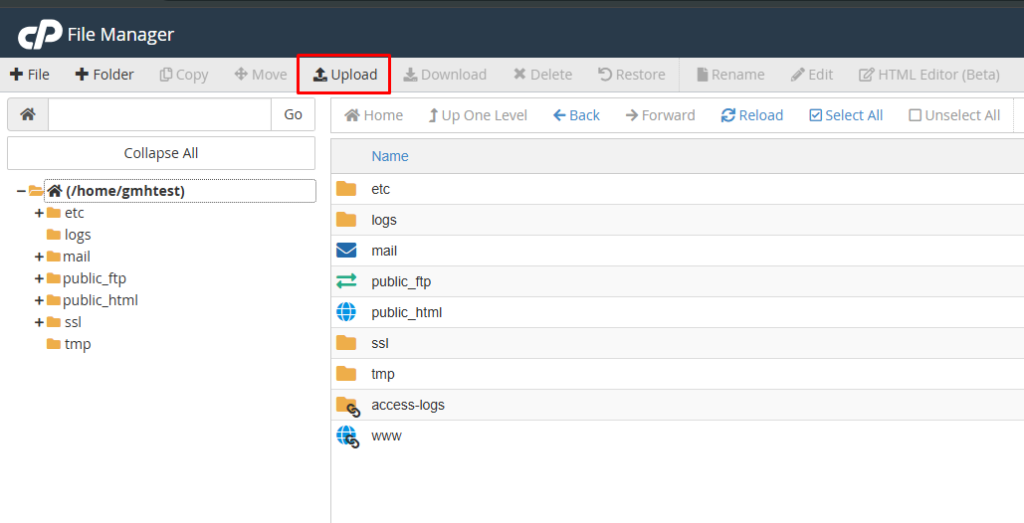
Use the Upload button to upload your file.
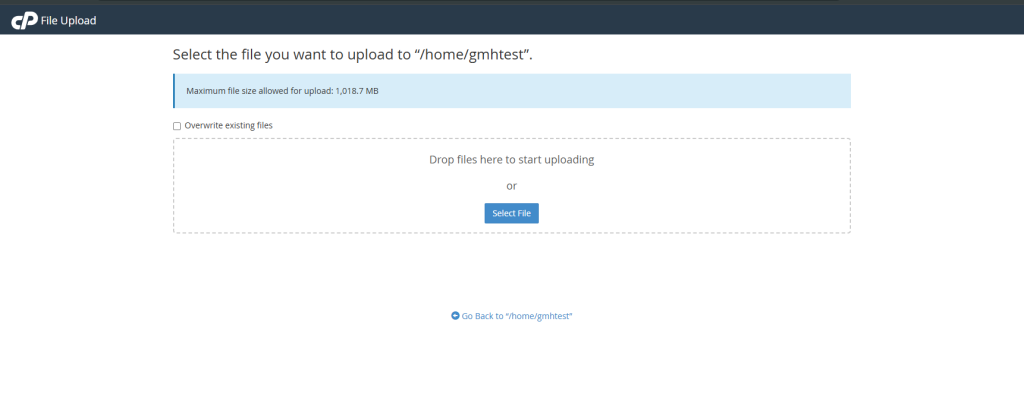
Here you can upload your cPanel backup file.
Alternatively, you may upload the backup using FTP.
- After uploading the backup, email [email protected] and our team will restore the backup for you.
If Your Third-Party Hosting Account Is Not Active but You Have a Full cPanel Backup Stored Online
- Visit https://gotmyhost.com and order a hosting package that fits your requirements.
- Once your hosting plan is active and you receive your Welcome Email, email [email protected] with:
- A direct download link to your full cPanel backup, or
- Access details to the location where the backup is stored.
Our team will check whether the backup can be transferred directly from the external source to your server. If not, we will advise you to upload the backup manually to your cPanel. Once the backup is in place, we will proceed with the restoration.
After Restoration: Update Your Nameservers
When your account has been fully restored on Gotmyhost servers, you may update your domain’s nameservers to point to Gotmyhost.
This step ensures minimal downtime during DNS propagation because:
- Locations where DNS has not yet propagated will still display the site from your previous host.
- Locations where DNS has completed propagation will load your site from Gotmyhost.
If you wish to preview your website directly from our server before propagation completes, you can follow the steps provided in our DNS preview tutorial.
FAQ
What is a cPanel Shared Hosting Account Transfer?
Transferring a cPanel shared hosting account means moving all your website files, databases, email accounts, domains/addons/parked, DNS zones, SSL certificates, cron jobs, and other settings from one hosting provider's server (or one cPanel account) to another. This is typically done when switching hosts for better performance, pricing, features, or support.
Why do people transfer shared cPanel accounts?
Common reasons include:
- Switching to a cheaper or faster provider.
- Upgrading to better support or newer server hardware/software.
- Consolidating multiple accounts.
- Leaving a provider due to poor service, outages, or policy changes.
What are the main methods to transfer a cPanel account?
There are three primary approaches:
- WHM Transfer Tool (fastest and most complete, recommended if available).
- Manual Full Backup & Restore (works even without WHM access).
- Provider-Assisted Migration (free service offered by most good hosts).
That’s it!
Your migration to Gotmyhost will be smooth, secure, and professionally handled.
Related Blog: https://blog.gotmyhost.com/cpanel-reseller-hosting-account-transfer-to-gotmyhost/
Visit us: www.gotmyhost.com