

Imagine your server crashing because one process hogged every resource. You need a setup that scales without the weight of a full VM. OpenVZ vs Docker is the choice you face when you need to move fast. One provides a virtual environment that feels like a full server. The other packages allow your app to run anywhere instantly.
This choice dictates your daily workflow. It changes how you patch systems and how you recover from failures.
If you value speed and portability, you need to understand these trade-offs. Get the facts here to avoid lock-in later. Launch your next project on Gotmyhost container hosting servers for the best performance.
What Is OpenVZ ?
OpenVZ uses operating-system-level virtualization. One physical server runs multiple Linux containers. These are often called VPS. Each container works like an independent system. All containers share the same kernel.
You get separate disk space and resource limits for each container. This keeps workloads isolated. It uses fewer system resources than traditional VMs.
This setup fits hosting providers well. You can create many lightweight environments on one server. It allows you to deploy fast and keep costs low. But the shared kernel means less flexibility. You stay within the limits of the host system. If the host kernel lacks a feature, your container lacks it too.
What Is Docker?
Docker runs your applications inside containers. It packages the app with its libraries and runtime. This ensures the software behaves the same in every environment.
You build the app once as an image. You run that image anywhere. It works the same on your laptop, the staging server, and in production. This consistency stops environment-related bugs before they start.
Docker uses the host kernel instead of a full virtual machine. This makes containers lightweight and fast. You can launch or stop them in seconds without wasting resources.
- Fast deploys
- Easy scaling
- Predictable workflows
This approach simplifies your pipeline. It lets you focus on building features instead of fixing server mismatches.
OpenVZ vs. Docker: Key Comparison Areas

This section compares how OpenVZ and Docker perform on a live server. You will see how each system handles resources, isolation, and scaling. The focus stays on practical impact. It explains how containers share CPU and memory and how isolation affects stability. It also looks at how each platform supports deployment and long-term growth. By the end, you will understand the trade-offs and know which option fits your server setup better.
Architecture
OpenVZ splits a Linux system into multiple containers that act like full servers. Every container shares the host kernel, which limits your flexibility to the host’s specific version. This model works best when you need to provide a complete OS environment to different users on one machine.
Docker packages applications into lightweight images containing only the necessary libraries. It uses namespaces and cgroups to isolate processes at the app level rather than the OS level. Use Docker for rapid scaling and consistent deployments across your pipeline.
Performance
OpenVZ runs with low overhead because all containers share one kernel. You get strong performance for stable, long-running workloads. Since it operates like a traditional VPS, resource usage stays predictable. This makes it a reliable choice for standard hosting environments where consistency matters most.
Docker also keeps overhead low but focuses on speed. You can launch or stop containers in seconds to handle changing traffic. While OpenVZ manages a full OS, Docker manages single applications. This allows for faster scaling and better resource density for modern microservices.
- OpenVZ: Best for steady workloads and VPS hosting.
- Docker: Best for dynamic apps and rapid scaling.
Your choice depends on your application’s behavior. If you need a stable server environment, go with OpenVZ. If you need to ship and scale code fast, use Docker.
Security
OpenVZ shares one kernel across all containers. This means a single kernel flaw can impact every environment on the host. You rely almost entirely on the host system for security. It is a rigid model that works if you trust the host but offers little room for custom security tuning.
Docker isolates applications at the process level. You can apply granular controls like namespaces, cgroups, and security profiles to limit what each container can do. This reduces the risk of a single app compromise affecting the entire stack. While both systems have risks, Docker provides more tools to harden your setup.
- OpenVZ: Shared kernel security
- Docker: Process-level isolation
- Security Tools: Docker supports seccomp and AppArmor
Most security failures come from poor configuration rather than the tool itself. Secure your next project with the robust infrastructure at Gotmyhost.
Accessibility
OpenVZ gives you a setup that feels like a regular VPS. You log in, manage files, and install software just like a standard Linux server. This makes it easy to start if you already use hosting panels or SSH-based workflows. It behaves exactly like the hardware you are used to managing.
Docker shifts the focus to the application. You manage containers with commands and configuration files instead of full systems. While it requires a learning curve, you gain precise control over how apps run. You can deploy, update, and scale faster once you master the workflow.
Real Use Cases for OpenVZ and Docker
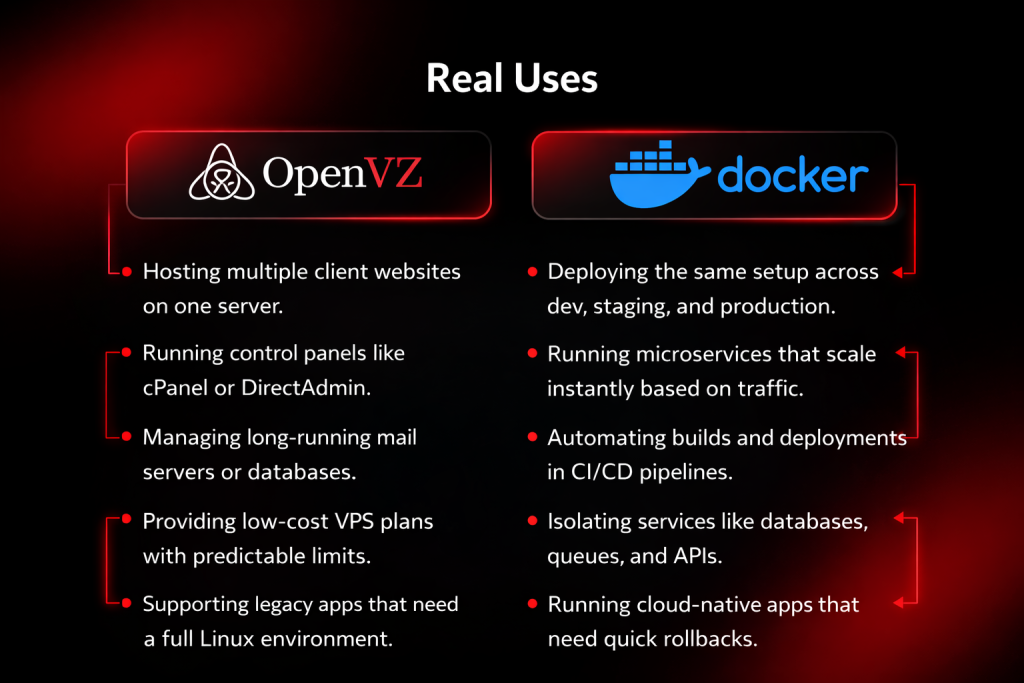
This section goes deeper into how OpenVZ and Docker are used in real production setups. You’ll see how each one behaves under different workloads, how teams use them day to day, and where they start to break. The goal is to help you match the tool to your actual use case, not just features on paper.
OpenVZ Use Cases
OpenVZ works best for multi-tenant hosting and simple server environments. It allows a provider to fit many isolated systems onto one physical machine with low overhead. It is the right choice for stable workloads that require a full OS feel without the weight of a virtual machine.
Use OpenVZ for these tasks:
- Hosting multiple client websites on one server.
- Running control panels like cPanel or DirectAdmin.
- Managing long-running mail servers or databases.
- Providing low-cost VPS plans with predictable limits.
- Supporting legacy apps that need a full Linux environment.
You choose OpenVZ when you want a standard VPS setup that remains easy to manage. It provides the independent server experience at a fraction of the resource cost. Deploy your reliable VPS environments on Gotmyhost for high-density, high-performance hosting.
Docker Use Cases
Docker works best when you build, update, and scale applications frequently. It focuses on speed and consistency rather than full system access. Because containers share the host kernel, they start in milliseconds and use significantly less memory than traditional virtual environments. This makes Docker the standard for teams that need to ship code fast without worrying about environment mismatches.
Use Docker for these tasks:
- Deploying the same setup across dev, staging, and production.
- Running microservices that scale instantly based on traffic.
- Automating builds and deployments in CI/CD pipelines.
- Isolating services like databases, queues, and APIs.
- Running cloud-native apps that need quick rollbacks.
You choose Docker when your workflow depends on repeatability and flexible scaling. It removes the friction between writing code and running it in production.
Deep Dive into Virtualization
This section breaks down the fundamental differences between OpenVZ and Docker to help you make informed deployment decisions. By understanding how each handles the kernel and container structure, you can choose the right tool for your infrastructure needs.
Do OpenVZ and Docker use the same kernel?
Both technologies run on the Linux kernel, but they use it differently. OpenVZ originally relied on a heavily modified kernel to create its isolation and resource management features (known as Beancounters). This custom kernel allows for high-density hosting, which is why it has been a staple for VPS providers for years.
How is an OpenVZ container different from a Docker container?
OpenVZ containers act like full virtual servers. They include their own init systems and system processes, behaving exactly like a standalone VPS where you can manage users, install multiple services, and log in via SSH. This makes them ideal for traditional, stateful workloads that require a full operating system environment.
What is the main purpose of OpenVZ vs Docker?
OpenVZ splits a single physical server into multiple VPS environments, making it a powerful choice for high-density hosting. It allows providers to offer independent server environments to different users with minimal overhead. If you need to manage traditional, long-running servers with predictable resource limits, this model is built for you.
Which one works better for VPS hosting?
OpenVZ is the better choice for traditional VPS hosting. It manages resources across many containers on a single server, making it ideal for providers who need to offer customers an environment that feels like a private, standalone machine. You get the familiar management of a standard Linux server, including root access and independent system processes, all while keeping overhead low.
Can Docker replace OpenVZ?
Docker has largely replaced OpenVZ for application deployment because it is more agile and consistent across different environments. Its focus on packaging single services into lightweight images makes it the standard for modern DevOps and microservices.
The Best Engine for Your Digital Growth
You’ve seen how OpenVZ vs Docker plays out in real setups. The choice comes down to what you need on your server. OpenVZ fits when you want low-cost VPS environments with stable resource use and simple management. Docker fits when you need fast deployments, consistent app behavior, and easy scaling across environments.
Both solve different problems. One focuses on running full systems. The other focuses on running applications cleanly and fast. Pick based on your workload, not trends. Review your setup, then move forward with confidence. Deploy your next project on Gotmyhost hosting solutions built for performance and control.
Read more: https://blog.gotmyhost.com/wp-admin/post.php?post=5002&action=edit