

If you have ever accessed a website on your smartphone that loaded in a flash, performed with remarkable smoothness, and prompted you to save it to your home screen, you have probably experienced a Progressive Web Application. These innovative solutions merge the reach of the web with the robust capabilities of native mobile applications, providing a frictionless user journey and a high-impact asset for modern enterprises.
At its core, a PWA is a website enhanced by advanced web technologies to function like a standard app directly within your browser. By bypassing app stores and avoiding time-consuming downloads, PWAs deliver immediate access to a reliable and captivating digital experience.
Tracing the Roots of PWA
The concept of web-based applications mimicking native experiences has long been explored, but it was not until 2015 that Google engineer Alex Russell and designer Frances Berriman officially introduced the term “progressive web application.” Their objective was to create web apps capable of progressive enhancement, enabling more sophisticated features on supported browsers.
While Google Chrome served as an early advocate, other major browsers soon integrated these technologies. By 2017, Firefox and Opera had adopted core PWA standards. A significant turning point occurred in 2018 when Apple updated Safari to support Service Workers, finally extending essential PWA functionality to iPhone users.
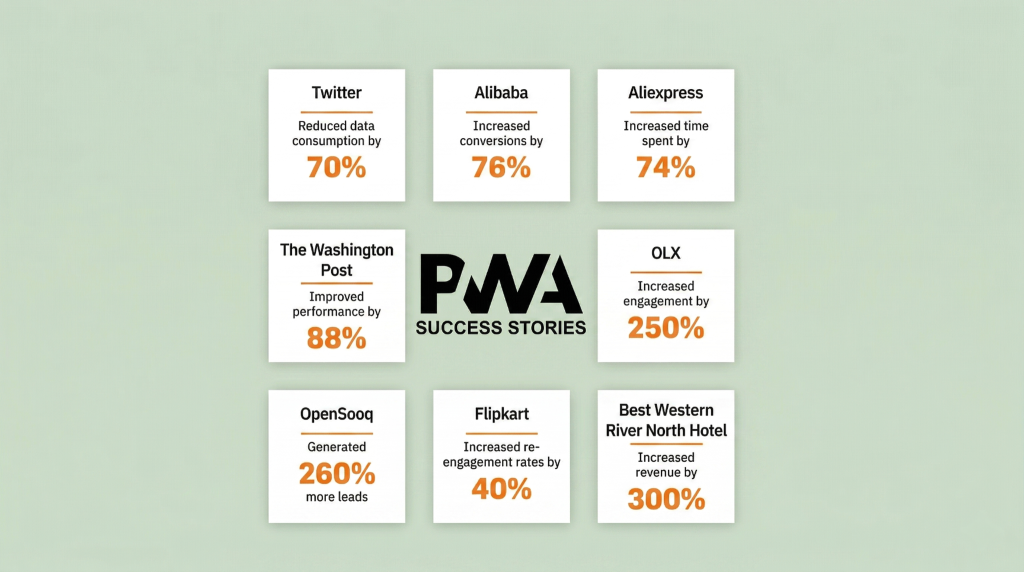
In a relatively short period, PWAs transitioned from an experimental concept to a primary development strategy. Industry leaders such as Starbucks, Pinterest, and Twitter have since demonstrated the effectiveness of this approach, reporting substantial gains following the rollout of their respective PWAs.
The Core Benefits of Progressive Web Apps
Progressive Web App technology incorporates a sophisticated suite of capabilities designed to elevate the digital landscape. By examining real-world applications, we can better understand the transformative advantages PWAs offer to both business owners and end-users.
From a commercial perspective, e-commerce and website owners stand to gain several strategic advantages:
- Enhanced conversion rates and customer acquisition.
- Extended session durations and improved site stickiness.
- A superior, more intuitive user experience.
- Optimized visibility and growth in organic search traffic.
- Reduced overhead costs compared to developing and maintaining native applications.
- Direct home screen accessibility for enhanced brand loyalty.
- A comprehensive uplift in performance and engagement, ultimately driving higher revenue.
For the end-user, the experience is defined by convenience and efficiency:
- Instantaneous load times and rapid interaction.
- Reliable offline browsing capabilities.
- A seamless, fluid navigation experience.
- Efficient data consumption for optimized performance.
- Frictionless one-click access via home screen icons.
You may be wondering—Are progressive web apps the future? All in all, PWA is a fresh, future-proof technology. They are favored and promoted by Google, and proven to show breakthrough results by some of the biggest names in the industry:
Essential Features and Technical Capabilities
The rise of PWA has marked a paradigm shift in the way we interact with the web, bringing along a collection of features ranging from subtle to radical – each contributing to the improved overall experience.
A full list of features is far too long, so here are the ones we are most excited about:
Instant Loading Time
Research indicates that if a digital platform requires more than three seconds to load, a significant 53% of visitors will abandon the session. Furthermore, the native-like experience provided by a PWA effectively eliminates the friction and latency associated with traditional browsing, serving as a pivotal factor in driving customer satisfaction.
Progressive Web Apps employ an advanced methodology designated as Client-Side Rendering (CSR). Through this approach, the rendering of content is executed directly within the client’s browser via JavaScript.
Rather than dispatching an entire HTML document from the server for every request, the user receives a streamlined string of data and a JavaScript file. This enables the browser to dynamically request and render only the requisite components of the page, resulting in a remarkable surge in overall loading speeds.
Discover the exceptional performance of this PWA demo store.
Offline Browsing
The functionality designated as “offline mode” transcends conventional web limitations, providing a robust experience that closely mirrors native performance. By implementing advanced custom rules that override standard browser caching, developers ensure that data storage remains resilient and entirely independent of the remote server.
In instances where connectivity is interrupted, the user journey continues without friction; one might envision browsing a preferred digital storefront with ease, even during a commute on the London Underground or while traversing areas with intermittent signal coverage.
Rather than encountering a disruptive 404 error when navigating backwards, users are presented with a cached iteration of previously accessed content. This sophisticated approach ensures that the digital experience remains coherent and informative, regardless of immediate server availability.
This resilience even extends to the checkout process, which can be initiated while in an offline state. In such scenarios, the transaction is securely queued and systematically processed the moment a stable network connection is reestablished.
Push Notification
To maintain sustained user engagement and effectively recapture visitors who have abandoned their shopping carts mid-transaction, Progressive Web Apps integrate robust support for push notifications. This capability serves as a sophisticated re-engagement tool within the digital ecosystem.
When implemented with strategic precision, this feature provides compelling incentives for consumers to interact with the application. Research indicates that such engagement can effectively double the session duration while simultaneously driving conversion rates by as much as fourfold.
Illustrating this impact, the retailer Beyond the Rack observed a significant 26% average increase in consumer spending and a 72% rise in time spent on their PWA among users arriving through push-enabled communications.
Whether utilized for disseminating marketing campaigns, providing real-time updates on order fulfillment, or sharing pertinent news, this functionality establishes a unique communication channel that seamlessly integrates a brand into the user’s daily digital routine.
Ready for App & Play Store
Establishing a presence within digital marketplaces remains a paramount strategic asset, often necessitating the significant investment typically associated with native iOS and Android development. However, Progressive Web Apps provide a sophisticated mechanism to effectively circumvent these traditional financial and technical barriers.
Through the implementation of advanced solutions like Trusted Web Activity, which elegantly encapsulates a web interface within a native application, a PWA can be transitioned into a native-ready asset in a matter of hours. This methodology preserves the efficiency of a singular codebase, as the resulting application operates primarily as a high-performance web view.
Ultimately, this enables seamless deployment to both the Apple App Store and Google Play Store, removing the friction of ground-up native development while ensuring a comprehensive and high-impact market reach.
Lightweight
Progressive Web Apps are engineered to deliver a premier user experience, offering a particularly high-impact solution for the modern mobile consumer.
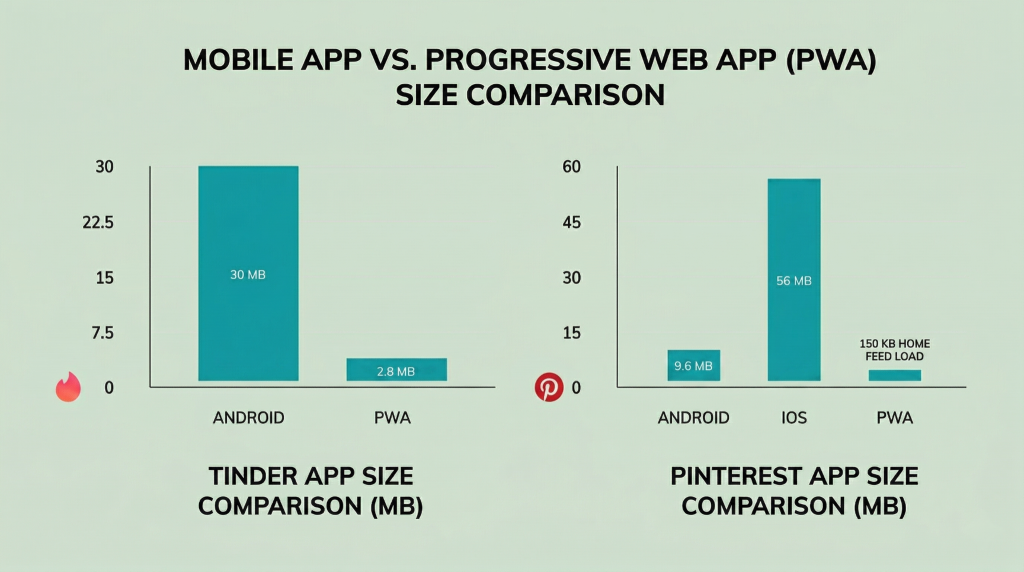
Notwithstanding their sophisticated suite of advanced features, these applications remain remarkably lightweight, ensuring fluid operation even within the constraints of low-bandwidth network environments.
A comparative analysis of the Tinder and Pinterest PWAs against their native Android and iOS counterparts reveals a level of efficiency and reduced technical overhead that is truly remarkable.
Home Screen Save
Securing a presence on the user’s home screen—arguably the most prestigious digital real estate—positions your brand identity prominently, ensuring your platform is accessible with a single interaction.
Progressive Web Apps possess a distinct strategic advantage over traditional websites and native applications by empowering users to install the PWA directly from their browser. This streamlined installation process significantly accelerates the speed of deployment and user adoption.
The implementation of a PWA effectively bypasses the need for conventional bookmarking or the cumbersome navigation of various app stores, removing the friction associated with searching for and downloading traditional software.
Furthermore, this methodology facilitates the creation of a comprehensive, native-like experience while circumventing the extensive development cycles and rigorous review protocols typically required for standard mobile applications.
Given their native-like architectural design, these applications eliminate the need for a visible browser interface once integrated onto the home screen; upon activation, the PWA launches in full-screen mode, operating as an autonomous and immersive digital environment.
Platform Agnosticism
Each digital ecosystem inherently possesses a unique set of advantages and inherent constraints, often presenting stakeholders with the complex challenge of navigating and overcoming platform-specific limitations.
Platform-agnostic solutions emerge as a highly efficient alternative to the resource-intensive process of developing and sustaining distinct native applications for web, iOS, and Android environments.
By leveraging Progressive Web App technology, enterprises can deliver a consistent and unified user journey to all visitors, ensuring high-impact engagement regardless of the specific platform utilized to interact with the application.
No Update Required
Traditional software updates frequently impose a cumbersome burden on users and represent a strategic liability for stakeholders. Progressive Web Apps effectively circumvent this challenge by implementing a real-time, background update methodology that ensures the platform remains perpetually current, seamlessly mirroring the dynamic behavior of a standard website.
Linkability & Indexing
Parallel to standard digital environments, Progressive Web Apps maintain unique URLs, facilitating seamless crawling and indexing by search engine algorithms. Diverging from the constraints of native applications, these platforms ensure that content remains discoverable directly within search engine results pages (SERPs).
The optimization of loading performance serves a dual purpose: meeting the rigorous criteria of search engine algorithms while concurrently elevating the overall satisfaction of the user base.
Implementation Methodology for PWA
Building a Progressive Web App (PWA) might sound complex, but it’s quite manageable when you break it down into steps. In this article, I’ll give you an overview of the process – and in my next tutorial, I’ll go into the process in more detail.
Start with a Basic Webpage
Create a simple website using HTML for structure, CSS for style, and JavaScript for functionality.
HTML File:
<!DOCTYPE html>
<html>
<head>
    <title>Ophy's To-Do List PWA</title>
</head>
<body>
    <h1>Ophy's To-Do List</h1>
    <input type="text" id="todo-input" placeholder="Add a new task...">
    <button onclick="addTask()">Add</button>
    <ul id="todo-list">
        <!-- Tasks will go here -->
    </ul>

    <script src="app.js"></script>
</body>
</html>
CSS File:
body {
    font-family: 'Arial', sans-serif;
}

#todo-list {
    list-style-type: none;
}

#todo-list li {
    padding: 5px;
    margin: 5px;
    background-color: #f2f2f2;
    border-radius: 3px;
}
JavaScript File:
function addTask() {
    var input = document.getElementById('todo-input');
    var newTask = input.value;
    if (newTask) {
        var listItem = document.createElement('li');
        listItem.textContent = newTask;
        document.getElementById('todo-list').appendChild(listItem);
        input.value = ''; // Clear the input
    }
}
Create a Manifest File
In the manifest file, write down your app’s name, the icons it uses, and the first page it should open. This makes your website act more like an app you can install.
{
  "name": "Ophy's To-Do List",
  "short_name": "OphyToDo",
  "icons": [
    {
      "src": "favicon.ico",
      "sizes": "64x64 32x32 24x24 16x16",
      "type": "image/x-icon"
    }
  ],
  "start_url": "/",
  "display": "standalone",
  "theme_color": "#000000",
  "background_color": "#ffffff"
}
Set Up a Service Worker
In your main JavaScript file, add a service worker. This is a special script that works separately from your website.
The service worker’s job is to handle how your app stores and retrieves data, especially for offline use.
self.addEventListener(‘install’, function(event) {
// Perform install steps
var CACHE_NAME = ‘ophy-todo-cache-v1’;
var urlsToCache = [
‘/’,
‘/styles.css’,
‘/app.js’
]; event.waitUntil(
caches.open(CACHE_NAME)
.then(function(cache) {
console.log(‘Opened cache’);
return cache.addAll(urlsToCache);
})
);
});
Following these steps will help you build a simple PWA that users can install and use, even when they’re offline.
PWA vs. Other App Types
How does a progressive web application stack up against traditional websites and native apps?
Traditional Websites
A traditional website requires a constant internet connection and reloads the page with every click. It can’t be installed, work offline, or send push notifications. While still essential for many use cases, PWAs offer a far richer and more reliable experience. The Washington Post saw a 23% increase in returning mobile users within a week of upgrading its traditional site to a PWA, simply by offering a faster and more resilient experience.
Platform Specific (Native) Apps
Native applications are engineered exclusively for a singular operating system, such as iOS or Android, and are disseminated through traditional digital marketplaces. While these solutions often provide the most profound level of OS integration and high-performance execution, they represent a resource-intensive challenge, necessitating substantial investment to develop and maintain across disparate platforms. Furthermore, they impose a degree of user friction by requiring a mandatory download through an app store, which can serve as a barrier to immediate engagement.
Head-to-Head Comparison: Web vs. Native
| Feature | Progressive Web Application | Native App |
| Distribution | Directly via the web (URL) | App stores (Apple, Google) |
| Installation | Optional, one-click install | Required, multi-step download |
| Reach | Cross-platform by default | Platform specific |
| Updates | Automatic and instant | Manual, via app store |
| Development Cost | Lower (one codebase) | Higher (multiple codebases) |
| Offline Access | Yes, via Service Worker | Yes, by design |
| Performance | Excellent, can be near native | Excellent, direct hardware access |
Real World Use Cases for PWAs
These real-world examples demonstrate the practical benefits and impact of offline-first strategies:
Starbucks: Starbucks has a PWA that lets customers look at the menu and order drinks and food even when they’re offline. This not only makes the experience better for customers but also helps increase sales and customer interaction with the brand, as they can order anytime, anywhere.
Khan Academy: Khan Academy, a well-known educational site, has a PWA allowing students to download and access lessons and courses without an internet connection. This feature is particularly helpful for those in areas with unreliable internet, ensuring uninterrupted learning. Just like the Starbucks PWA, Khan Academy’s use of this technology improves the user experience, making education more accessible and flexible.
Trivago: Trivago, a popular hotel search engine, developed a PWA to enhance user experience, especially for travelers with unstable internet connections. The PWA allows users to browse hotel deals and information offline, making trip planning more flexible and accessible. This has led to increased user engagement and higher conversion rates, as travelers can continue interacting with the app even in areas with poor connectivity.
Forbes: Forbes, a leading global media company, launched a PWA to improve the mobile experience for its readers. The PWA significantly reduced loading times and allowed offline reading of articles. This innovation not only enhanced user engagement but also resulted in a noticeable increase in readership and time spent on the site. The Forbes PWA demonstrates how media outlets can leverage offline-first strategies to reach and retain a wider audience, regardless of their internet connectivity.
Common Progressive Web App Inquiries
Explore the most commonly asked questions about Progressive Web Apps. Discover how PWA technology bridges the gap between web and mobile apps to deliver a faster, more reliable, and engaging user experience for your customers.
What is a Progressive Web App (PWA)?
A PWA is a type of application software delivered through the web, built using common web technologies including HTML, CSS, and JavaScript. It is intended to work on any platform that uses a standards-compliant browser.
Does a PWA work offline?
Yes! One of the key features of a PWA is its ability to work offline or on low-quality networks using service workers to cache important data.
Do I need to download a PWA from an app store?
No. You access a PWA directly through its URL in a web browser. There is no mandatory app store download, which is a major benefit. Some PWAs can be optionally listed in app stores such as the Microsoft Store or the Google Play Store, but their primary distribution channel is the open web.
Are PWAs secure?
Absolutely. PWAs must be served through HTTPS to ensure that the connection is secure and the data is protected.
How do PWAs differ from native mobile apps?
Unlike native apps, PWAs don’t need to be downloaded from an app store. They are much smaller in size, easier to update, and can be accessed directly via a URL, while still offering app-like features like push notifications and home screen icons.
Why PWAs Matter in Modern Web Development
Progressive Web Apps (PWAs) represent a fundamental shift in modern web development by successfully merging the expansive reach of the web with the robust capabilities of native mobile applications. They matter because they solve critical pain points for both businesses and end-users. For businesses, PWAs drive a comprehensive uplift in performance and engagement, resulting in enhanced conversion rates, reduced overhead costs compared to developing native applications, and strengthened brand loyalty via direct home screen accessibility. For the user, PWAs deliver a superior experience characterized by instantaneous load times, reliable offline browsing capabilities through service workers, and frictionless one-click access. By being platform-agnostic, offering automatic updates, and bypassing the need for mandatory app store downloads, PWAs have become a primary, future-proof development strategy, proven effective by major industry leaders. Ultimately, the PWA model eliminates user friction and maximizes market reach with a single, efficient codebase.
Businesses looking to improve their online presence with a modern business website can also benefit from PWA technology, as it helps deliver faster performance, better user engagement, and a smoother mobile experience.
Read more: 5 Key Considerations to Build a Powerful Small Business Website
Ready to Elevate Your Web Experience?
Don’t let slow load times or complex installations hold your business back. Whether you’re looking to build a high-performance PWA from scratch or want to optimize your existing hosting infrastructure for speed and reliability, Gotmyhost is here to help.
Get Started with Gotmyhost Today – Your partner in high-performance web hosting and modern development solutions.