
How to Manage WordPress User
To Manage WordPress User follow the steps: 2. Enter your Username, email, and first and last name (you can…

Lorem ipsum dolor sit amet, consectetur adipiscing elit, sed do eiusmod tempor incididunt ut labore et dolore magna aliqua. Faucibus turpis in eu mi bibendum neque egestas congue quisque.
To Manage WordPress User follow the steps: 2. Enter your Username, email, and first and last name (you can…
To Add New WordPress User follow the steps: 3. Fill up all required information and select Role from the…
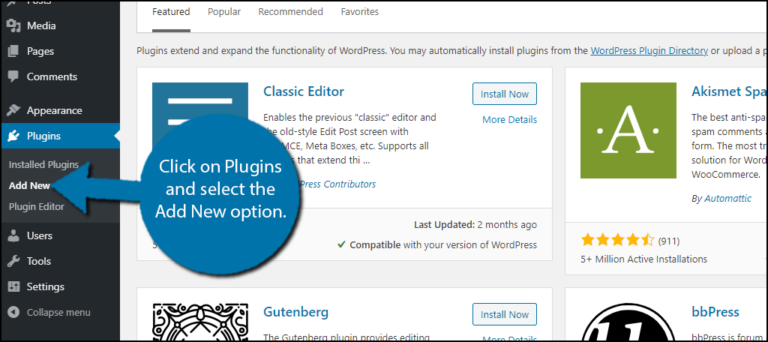
Use these steps to Install & Disable WordPress Plugins: 1. Log in to your WordPress 2.Hover on Plugins from…
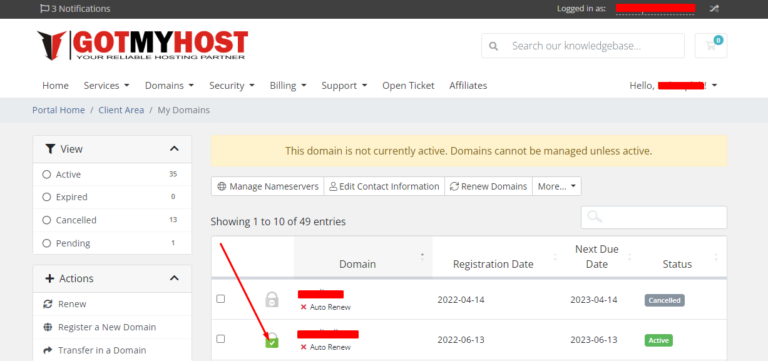
1. Log in to your Gotmyhost client area for Enable & Disable Domain Auto-Renewal Service in the client area…
1. Log in to cPanel to Remove WordPress from Softaculous. 2. Search Softaculous Apps Installer in your cPanel. 3.…
1. Log in to your cPanel to change the PHP version in cPanel 2. Search Multiphp Manager in the…
To create and set private name-servers: 1. Log into the Gotmyhost client area and go to domains to create…
To connect VPS using SSH first, you have to download and install an SSH client like Putty. I will…
First log into your GotMyHost client area account to Login cPanel using client area. 2. Select the hosting of the…
1. Log into your Gmail account and go to settings for adding Web mail with Gmail. Login Into your…